Loading...
AIagentsAI rulesAI setupvibecoding configuration
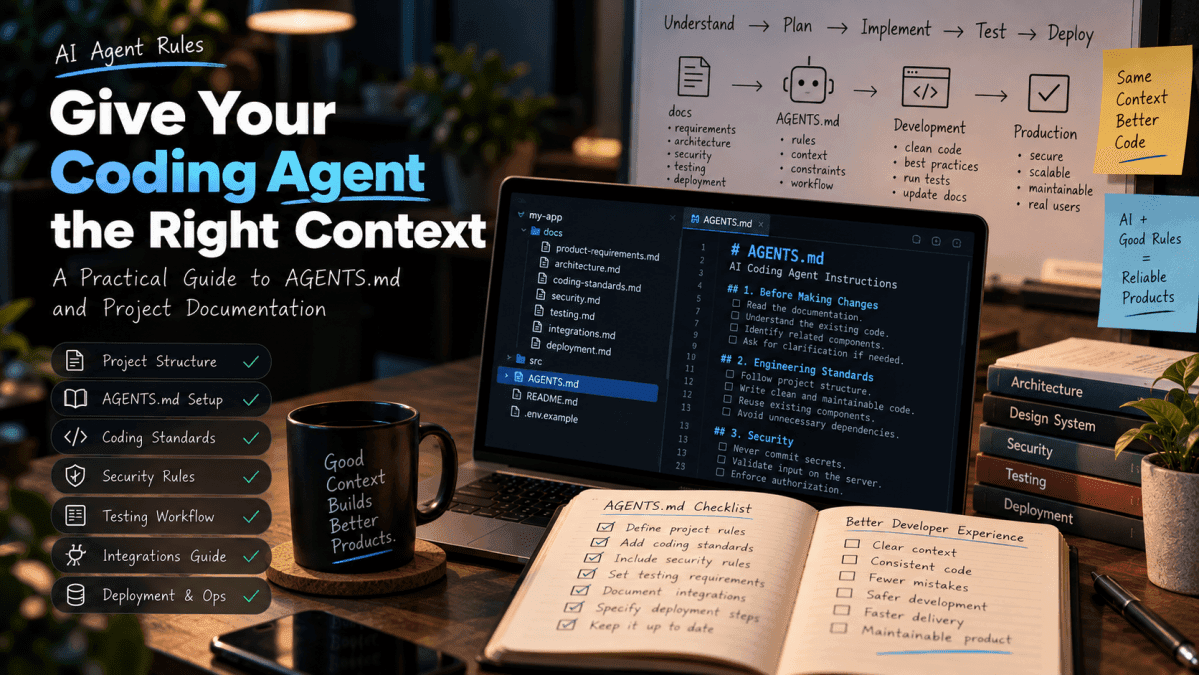
AI Agent Rules for Vibe Coding: How to Set Up AGENTS.md and Markdown Files
AI coding agents can generate code quickly, but they need project context and clear engineering rules to produce maintainable results. Learn how to structure AGENTS.md, organize Markdown documentation, and create a repeatable workflow for AI-assisted development.
Imagine asking an AI coding agent to build a new feature in your application.
It creates the UI, adds an API endpoint, updates the database, and reports that the work is complete. At first glance, everything looks good.
Then you review the changes and discover that it introduced a second button component, ignored your existing API conventions, skipped error handling, and modified files unrelated to the feature.
The problem may not be the AI model. It may be that the agent did not have enough information about how your project is supposed to work.
This is one of the most important lessons in vibe coding: the quality of an AI-generated implementation depends not only on the prompt, but also on the context, constraints, and verification process surrounding it.
That is where AI agent instruction files and project documentation become useful.
In this guide, we will build a practical system for configuring coding agents using AGENTS.md, Markdown documentation, security requirements, testing rules, and a repeatable implementation workflow.
The examples are designed for developers working on real applications—not just one-off prototypes.
1. What are AI agent rules?
AI agent rules are instructions that guide a coding agent while it works inside a repository.
They can explain:
-
Which architecture and coding conventions the project follows
-
Which files the agent should read before making changes
-
How components, APIs, and database operations should be implemented
-
Which security requirements must be respected
-
What tests and checks should be run
-
What the agent must report before declaring a task complete
Think of them as a shared engineering handbook for your AI coding workflow.
Without project-specific instructions, an agent may rely on assumptions or patterns from unrelated projects. With well-structured instructions, it has a clearer starting point.
However, agent rules are not guarantees. They influence the agent's behavior; they do not replace automated enforcement, testing, code review, or server-side security controls.
2. What is AGENTS.md?
AGENTS.md is a Markdown file used to communicate project instructions to coding agents that support it.
It can contain engineering standards, repository-specific constraints, testing requirements, and other guidance relevant to working in the codebase.
For example:
Plaintext
A root-level AGENTS.md can provide shared guidance for the repository. Some tools also support more specific instruction files in subdirectories.
The exact discovery rules depend on the coding tool. Verify which filenames, locations, and inheritance rules your agent supports rather than assuming every tool reads the same configuration.
What belongs in AGENTS.md?
Keep the root instruction file focused on the rules an agent needs frequently.
Good topics include:
-
The first steps the agent must take before editing
-
Architecture and implementation conventions
-
Code-quality expectations
-
Security requirements
-
Testing and verification commands
-
Restrictions on unrelated changes
-
Required completion reports
Avoid turning the file into a huge collection of unrelated implementation details. Detailed documentation can live in separate Markdown files and be referenced from the instructions.
3. Create the right Markdown documentation structure
One instruction file cannot explain every detail of a growing application.
A better approach is to separate project context into documents with clear responsibilities.
Here is an example structure:
Plaintext
This is a starting structure, not a requirement to create every file for every project.
README.md — How to work with the project
The README should help a developer understand and run the application.
Include:
-
What the application does
-
Required tools and runtime versions
-
Installation steps
-
Environment-variable setup
-
Development commands
-
Testing commands
-
Build and deployment basics
product-requirements.md — What the application should do
Document the users, requirements, workflows, and acceptance criteria.
For example:
Plaintext
architecture.md — How the application is organized
Describe the main components, data flow, APIs, and technical decisions.
The goal is to help the agent extend the existing architecture instead of inventing a competing one.
coding-standards.md — How code should be written
Record language conventions, naming standards, component patterns, error-handling conventions, and dependency policies.
security.md — What must never be compromised
Document authentication, authorization, input validation, secret management, logging, and other project-specific security expectations.
testing.md — How changes must be verified
Specify the test framework, critical user journeys, relevant commands, and conditions that must pass before a change is considered complete.
integrations.md — How external services are connected
Document payment gateways, email providers, analytics, storage, webhooks, or other integrations used by the application.
deployment.md — How changes reach production
Record environment configuration, build steps, migrations, production checks, and recovery procedures.
The principle is simple: put each important decision in one clear place, and make the agent aware of the relevant document when it starts a task.
4. A practical root AGENTS.md template
The following template can be adapted for a web application using a framework such as Next.js or React with a backend.
Do not copy it blindly. Replace the example commands and conventions with those that actually exist in your repository.
Plaintext
This gives the agent a consistent working process without requiring every feature prompt to repeat the same rules.
5. Use layered instructions for larger projects
As a repository grows, a single root file may become difficult to maintain.
You can use a layered approach:
<box gap={2}> <box border radius="lg" padding={3} gap={1}> Layer 1 — Root instructions
Plaintext
</box> <box align="center"> <icon name="arrow-down" size="lg" color="secondary" /> </box> <box border radius="lg" padding={3} gap={1}> Layer 2 — Domain documentation
Plaintext
</box> <box align="center"> <icon name="arrow-down" size="lg" color="secondary" /> </box> <box border radius="lg" padding={3} gap={1}> Layer 3 — Local instructions
Plaintext
</box> </box>
For example, a payment module may need stricter rules around webhook verification, duplicate event handling, idempotency, and reconciliation. A UI module may need rules about reusable components, accessibility, and responsive behavior.
Keep domain-specific rules close to the code they govern when your tool supports that approach.
Be careful with instruction inheritance: different agents interpret nested instructions differently. Confirm which files apply to each task.
6. Write rules that are specific and testable
A common mistake is writing vague instructions such as:
-
Write clean code.
-
Make the application secure.
-
Use best practices.
-
Make everything production-ready.
-
Ensure the UI is perfect.
These statements express intentions, but they do not define observable behavior.
Improve them by specifying what the agent should do and how the result will be verified.
Vague rule
More useful rule
Write clean code
Reuse existing components and avoid duplicating business logic.
Make the API secure
Verify authentication, authorize the requested resource, and validate input on the server.
Test the feature
Add tests for the success path, invalid input, and relevant failure conditions.
Improve the UI
Verify loading, empty, error, and success states at supported screen widths.
Do not break anything
Run the relevant regression tests and report any failures.
Use environment variables
Document required variables and keep private credentials out of client-side code.
Specific instructions are easier to review and easier to turn into automated checks.
7. Keep the agent's context focused
More documentation does not automatically mean better results.
If an agent receives too many unrelated rules, long documents, and repeated instructions, it can become harder to identify the information that matters for the current task.
Use a focused context-loading workflow:
-
Read the root instructions.
-
Inspect the existing implementation.
-
Identify the relevant module.
-
Read only the documentation that applies to the task.
-
Summarize the implementation plan.
-
Make the smallest complete change.
-
Verify the result against the acceptance criteria.
For example, if you are changing a dashboard chart, the agent probably needs the dashboard's data contract, UI conventions, and relevant tests. It may not need the full payment-webhook documentation.
If you are modifying billing behavior, the payment and security documents become essential.
A good repository makes it easy to discover the right information without loading everything into every task.
8. Separate instructions from enforcement
This distinction is critical.
An instruction such as "never expose secrets" is useful, but it cannot guarantee that a secret will not be committed or bundled into browser code.
Where possible, enforce important requirements through tools.
Requirement
Instruction
Stronger enforcement
Consistent formatting
Follow formatting conventions
Formatter and lint checks
Type correctness
Avoid unsafe type assumptions
Type checker and code review
No committed secrets
Keep credentials private
Secret scanning and repository controls
Correct authorization
Check ownership
Automated authorization tests and server-side checks
Safe dependencies
Avoid unnecessary packages
Dependency review and vulnerability scanning
Reliable builds
Keep changes buildable
CI build checks
Required tests
Test changed behavior
CI test suite and coverage review
No single check proves an application is secure. Use multiple complementary controls.
For critical requirements, the application itself must enforce the rule regardless of what the AI agent does.
9. A complete workflow for building a feature with an AI agent
Here is a practical process you can reuse.
Step 1: Describe the task
Give the agent a single feature with a clear goal and measurable acceptance criteria.
Avoid asking it to redesign the entire application when the actual need is to fix one workflow.
Step 2: Ask for repository inspection
A useful initial prompt is:
Plaintext
This lets you review the proposed direction before changes begin.
Step 3: Approve the implementation plan
Check that the plan respects the existing architecture and does not introduce unnecessary dependencies or unrelated changes.
Step 4: Implement in a small scope
Ask the agent to implement the agreed feature and its necessary tests.
If the task becomes too large, split it into smaller steps.
Step 5: Run the checks
For a Node.js project, the relevant commands might include:
Plaintext
Use the commands configured by your actual project. These examples will not work unchanged in every repository.
Step 6: Review the diff
Look at what changed—not just what the agent says changed.
Check for:
-
Unexpected file modifications
-
Duplicate logic
-
Unnecessary packages
-
Missing error handling
-
Authorization gaps
-
Incomplete tests
-
Unintended behavior changes
Step 7: Verify acceptance criteria
Manually or automatically confirm that each requirement has been met.
Step 8: Request a truthful completion report
The agent should identify what was changed, what checks were run, what failed, and what remains unverified.
A feature is not complete simply because the agent produced a confident summary.
10. Common mistakes when configuring AI coding agents
Mistake 1: Creating an enormous instruction file
A long file full of repeated rules can be difficult to maintain.
Better approach: Keep shared rules concise and move detailed domain guidance into separate documents.
Mistake 2: Assuming every agent reads AGENTS.md
Not all tools use the same instruction filenames or discovery rules.
Better approach: Check the documentation for your specific agent and verify that the instructions are actually being applied.
Mistake 3: Writing rules without acceptance criteria
"Make the feature robust" does not explain what successful behavior looks like.
Better approach: Define observable outcomes and failure cases.
Mistake 4: Treating documentation as a substitute for tests
An agent may follow instructions imperfectly or misunderstand the requirement.
Better approach: Convert important expectations into automated tests, CI checks, and server-side controls.
Mistake 5: Letting documentation become outdated
Instructions that describe an old architecture can make new changes worse.
Better approach: Update the relevant documents when implementation decisions change.
Mistake 6: Asking the agent to modify too much at once
Large changes make review and debugging harder.
Better approach: Use small, independently verifiable tasks.
Mistake 7: Accepting unverified claims
A report saying "all tests passed" is meaningless if the tests were not actually run.
Better approach: Check the command results and distinguish executed checks from checks that remain pending.
11. Your reusable AI agent setup checklist
Before starting a substantial AI-assisted project, verify the following.
Project context
-
A root instruction file exists if supported by the selected tool.
-
The README explains installation and development.
-
Product requirements and acceptance criteria are documented.
-
The architecture and data model are clear.
-
Existing conventions are discoverable.
Engineering standards
-
Code-quality expectations are specific.
-
Dependencies must have a clear purpose.
-
Error and empty states are addressed.
-
Documentation changes are expected when appropriate.
-
Unrelated modifications are avoided.
Security
-
Secret-management rules are documented.
-
Server-side authentication and authorization are required where appropriate.
-
Input validation is defined.
-
Resource ownership is enforced.
-
Sensitive data is excluded from inappropriate logs.
-
Critical security requirements have independent tests or controls.
Verification
-
Relevant test commands are known.
-
Important success and failure paths are covered.
-
Type checking, linting, and builds are included where applicable.
-
Changes are reviewed through a diff.
-
The agent reports unverified work honestly.
Maintenance
-
Documentation has clear responsibilities.
-
Duplicate instructions are minimized.
-
Tool-specific instruction behavior is understood.
-
Instructions are updated when architecture changes.
Conclusion: Give AI coding agents a system, not just a prompt
Vibe coding becomes more predictable when the AI agent understands the project before it starts changing code.
A well-maintained AGENTS.md file, supported by focused Markdown documentation, can help establish consistent coding practices, reduce repeated explanations, and make implementation work easier to review.
But the real benefit comes from combining instructions with a disciplined workflow: inspect, plan, implement, test, review, and verify.
Start small. Create the root instructions, document your most important architecture and security decisions, and add more detailed guidance as the project grows.
The goal is not to make an AI agent follow a perfect prompt. It is to build a development process in which good results are easier to produce and mistakes are easier to detect.
Further reading
-
The Ultimate Pre-Vibe-Coding Checklist: Prepare your requirements, architecture, testing strategy, and deployment workflow before building.
-
The UI/UX Checklist for Vibe-Coded Applications: Validate usability, accessibility, responsiveness, and interface states.
-
The Complete Vibe Coding Starter Kit: Organize reusable instructions, checklists, and development workflows.
-
Testing and Security with AI Coding Agents: Turn engineering expectations into verifiable checks.
This article is intended as a practical engineering guide. Adapt the examples to your chosen AI coding tool, framework, and repository, and verify tool-specific behavior before relying on it.
Was this post helpful?
Comments
0Be the first to share your thoughts.