Loading...
MyDataGitDeveloper ToolsGitDevOpsEnvironment VariablesConfiguration ManagementSecrets ManagementSoftware Development
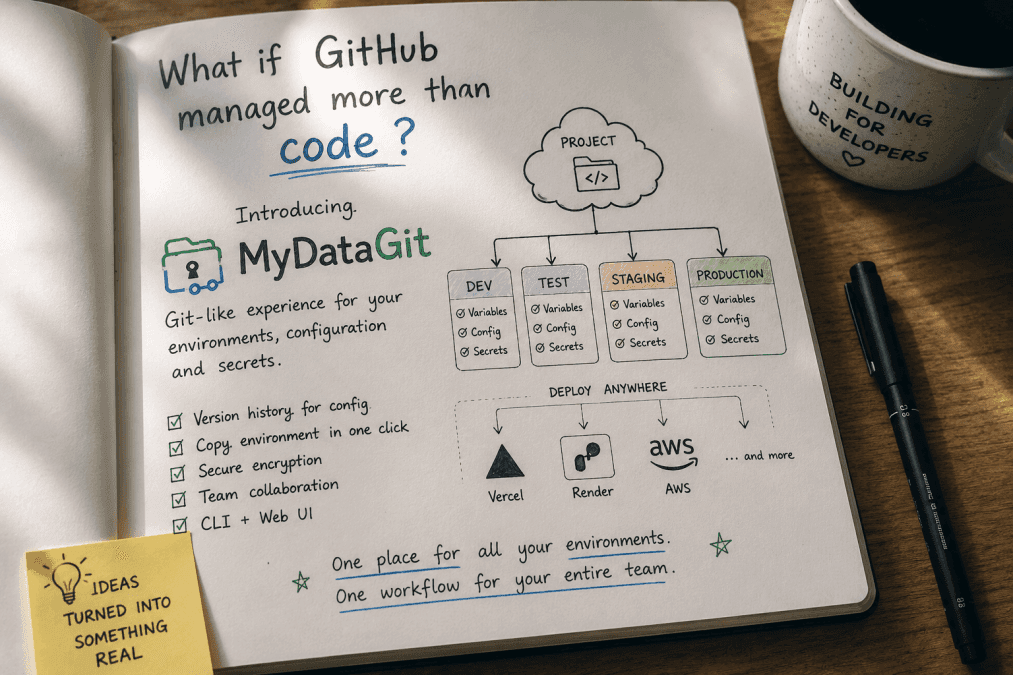
MyDataGit: What If GitHub Managed More Than Code?
Git is amazing at managing source code. But what about the environment variables, configuration, and deployment data that our applications depend on? MyDataGit is a project idea exploring what happens when we give that data the same developer experience we already expect from Git.
Every Developer Knows This Problem
There is a moment in almost every project when the code is ready.
The application works.
The tests pass.
The deployment is ready.
And then someone asks:
"Where is the
.envfile>"
And suddenly, things get complicated.
Maybe it's on your laptop.
Maybe it's in Vercel.
Maybe another developer has the latest version.
Maybe the production values are stored somewhere else.
And sometimes you end up sending something like this over chat:
Hey, can you send me the latest environment variables?
We've all seen some version of this.
And that's what made think:
Why is managing application configuration still so disconnected from the way we manage code?
Git Solved One Half of the Problem
Git changes the way developer work.
We can create branches:
Plaintext
We can see history.
We can compare changes.
We can collaborate.
We can roll back.
Most developers don't have to think twice about where their source code belongs.
It goes into Git.
But configuration is different.
A typical project might look like:
Plaintext
The .env file might contain:
Plaintext
We don't want those values in a public Git repository.
So we remove .env from Git.
That is the right security decision.
But it creates another problem:
Now the configuration lives somewhere else.
Where Does Your Configuration Live?
Think about your current workflow.
you might have:
Plaintext
Your source code is in one place.
Your configuration is in several places.
Your deployment configuration is somewhere else.
Your team members may have different local copies.
And suddenly something that should be simple becomes difficult to answer:
"What configuration does this application actually use?"
That's the problem I want to explore with MyDataGit.
Meet MyDataGit
The idea is simple:
"What if application configuration had a Git-like experience?"
Not another .env file
Not another folder hidden somewhere on your computer.
A platform where application configuration could be managed around the same concepts developers already understand:
- Projects
- Environments
- Versions
- Changes
- History
- Collaboration
- Access control
- Deployment
Think about a project like this:
Plaintext
Each environment has its own configuration.
The application code can stay the same.
The environment can change.
Why Environments Matter
Imagine your application has:
Plaintext
Development might connect to: localhost
Test might connect to: test-db.example.com
Staging might connect to: staging-db.example.com
Production might connect to: prod-db.example.com
The code doesn't necessarily change.
The configuration does.
MyDataGit would make that relationship visible.
Plaintext
The Small Feature That Makes This Useful
Here's one feature I really like about this idea.
Copy Environment
Imagine deploying your project to Vercel.
You select:
staging
Then:
[ Copy Environment]
You get the environment variables in a format that can be pasted directly into your deployment platform.
Then you're deploying the same Git repository somewhere else, perhaps on Render.
You select:
Test
Click:
[Copy Environment]
Paste.
Done.
The workflow becomes:
Plaintext
It is a very small idea.
But small ideas can remove surprisingly annoying problems.
But Isn't This Just a Password Manager?
Not exactly.
A password manager answer:
"Where should I store this secret?"
MyDataGit is trying to answer a different question:
"How should my application's configuration be managed through its lifecycle?"
Those are different problems.
Configure has relationships.
For example:
Plaintext
That's more than simply storing a password.
Configuration Should Have History Too
Imagine someone changes: REDIS_URL=old-server
to: REDIS_URL=new-server
With a Git-like configuration system, you could see:
Plaintext
Now you can ask:
- Who changed it?
- When did they changed it?
- What changes?
- What was the previous value?
- Which environment was affected?
And if something goes wrong?
You may want to roll it back.
That's where the idea starts becoming interesting.
The Bigger Vision
MyDataGit isn't really about .env files.
That's just where the idea starts.
The bigger vision is:
Plaintext
all becoming easier to manage together.
Git already gives developers an incredible workflow for source code.
What if configuration could have a similar experience?
What if you could look at a project and understand:
Plaintext
all from one place?
That's the direction I'm exploring with MyDataGit.
I'm Not Trying to Replace Git
This is important.
MyDataGit isn't meant to replace GitHub.
Your source code should still live in Git.
Your pull requests should still happen there.
MyDataGit sits beside that workflow.
Think:
Plaintext
Each tool has a job.
What Comes Next?
The idea is only the beginning.
The next question is much more practical:
"How would a developer actually use MyDataGit?"
Would you need another dashboard open all day?
Probably not.
Developers already have a place where they are comfortable:
the terminal.
So the next part of this series is about the MyDataGit CLI.
We'll look at what commands like these could feel like:
Plaintext
And more importantly, we'll look at how the CLI could fit into a normal development workflow without getting in the developer's way.
That's where the idea starts becoming a real tool.
Continue the series
Next: The MyDataGit CLI
The terminal is where developers build. Let's see what managing environments from the CLI could look like.
Was this post helpful?
Comments
0Be the first to share your thoughts.